

 Deutsch
 Français
 Español
 Nederlands
 Italiano




We're sorry to hear that you'd like to delete your GetMyInvoices account. Before you take this final step, we recommend that you contact our support team one more time. Often, issues such as technical questions or account adjustments can be resolved quickly, and together we can find a solution that works for you. If you still decide to cancel, you can delete your GetMyInvoices account from your dashboard.
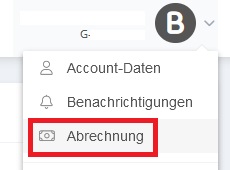
- Click on your account name in the top right corner.
- Select Billing from the dropdown menu.
- In the Billing section, click Cancel Account in the top right corner.
- Follow the instructions to complete the cancellation.
Important Note: Please note that canceling your account will irrevocably delete all uploaded documents and saved settings. Make sure you’ve backed up all important data before deleting your account.
Need help? If you still have questions or are unsure about anything, don’t hesitate to contact us . Our team will be happy to assist you and is here to help with any concerns you may have.