

 Deutsch
 Français
 Español
 Nederlands
 Italiano




You can import transactions older than 90 days from your online banking account using a CSV file. This allows you to add entries that GetMyInvoices did not import automatically.
Step 1: Open the menu
- Select “Banking” from the menu on the left.
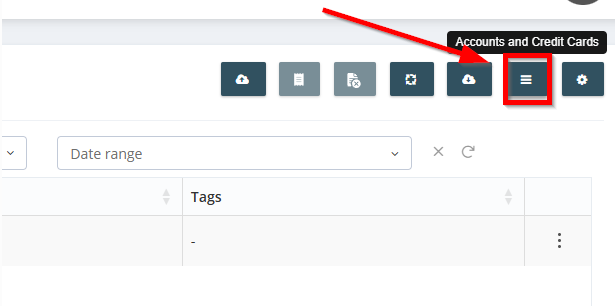
- Click the menu icon “Account and Credit Card” (three horizontal lines).
Step 2: Upload the File
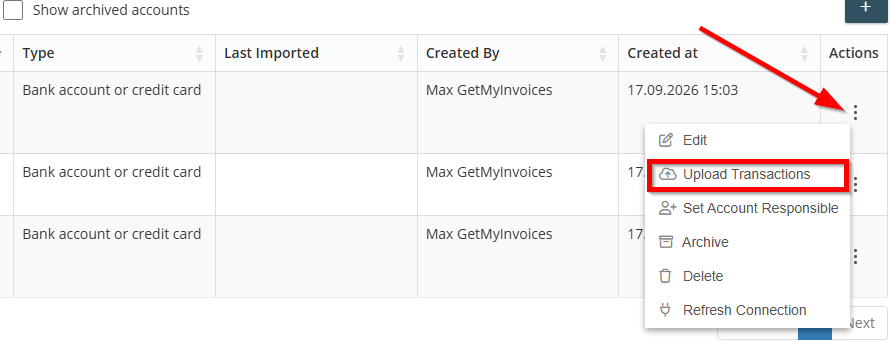
- Select the desired account.
- Click the three dots under “Actions” on the right.
- Select “Upload Transactions.”
Step 3: Upload File - Match Fields
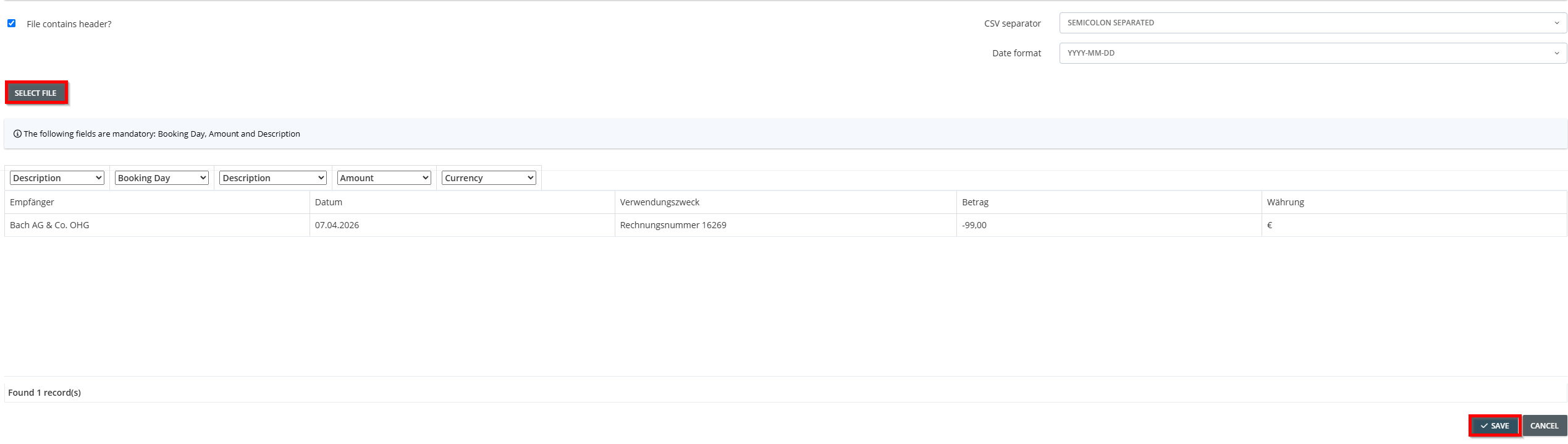
- Click “Select File.”.
- Select the file you want to upload.
- Use the drop-down menu to assign the column headers. “Ignore” is selected by default.
- Leave columns that you do not want to import set to “Ignore.”
- These fields are required: Amount, Currency, Transaction Description (Invoice Number), and Transaction Date.
- Pay attention to the signs: negative amounts represent incoming invoices, and positive amounts represent outgoing invoices.
- Click Save to complete the import.
Important Note:
- The file should contain only transactions that are older than 90 days.
- If transactions already exist in GetMyInvoices, duplicates may occur.