

 Deutsch
 Français
 Español
 Nederlands




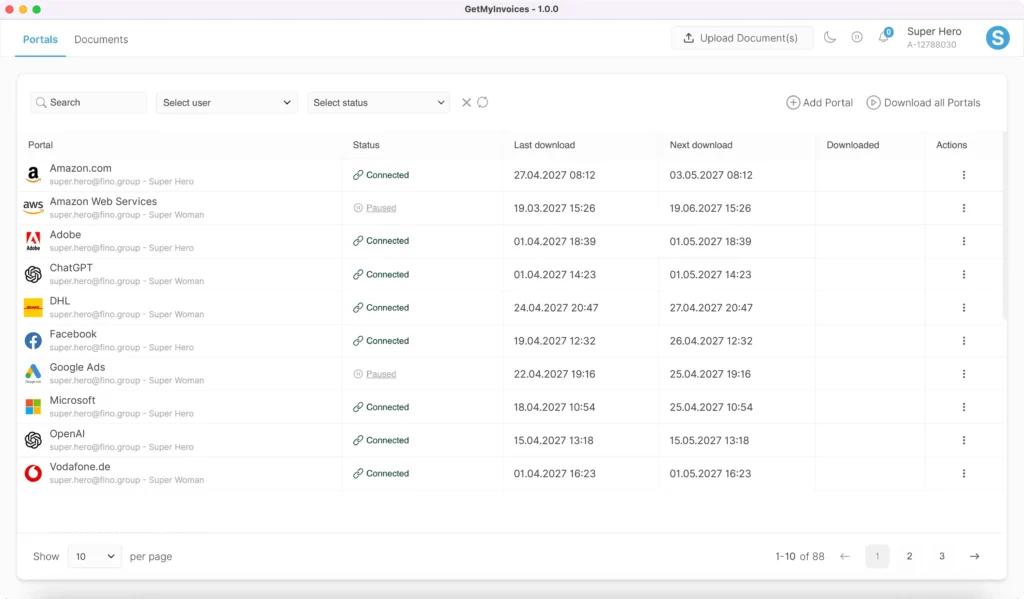
With the GetMyInvoices desktop app, importing invoices is now even easier, more secure, and more transparent. Automatically download your invoices from thousands of online portals and organize them all in one place. Using the desktop app (Windows, macOS), you can automatically connect to all your portals and keep track of your documents at all times. Benefit from a clear overview, high security, and efficient document management-all directly from your desktop.
How it works
The connection to the online portals is established via a local, integrated browser. You decide whether you want to save your login details with us or not. This means that you can either log in to the portals manually-without your passwords being transferred-or the desktop app will do this automatically if you have saved your login details.
Advantages at a glance
- Automated invoice retrieval: Your invoices are automatically downloaded in the background.
- Secure connections: Connect to portals without saving passwords - ideal for multiple accounts and maximum security.
- Flexible login: Logins are done via your own browser. Even if sessions have expired, logging in again is easy.
- Smart reminders: A red dot in the taskbar indicates when action is required. (Tip: Pin the desktop app to the taskbar!)
- Compatible: Use password managers or passkeys as you wish.
- Resource-friendly: The connector requires very little memory, while downloads continue in the background via the API.
Practical application
- Direct upload: Import files directly into GetMyInvoices - no login required.
- Document overview: View your invoices immediately and manage them centrally.
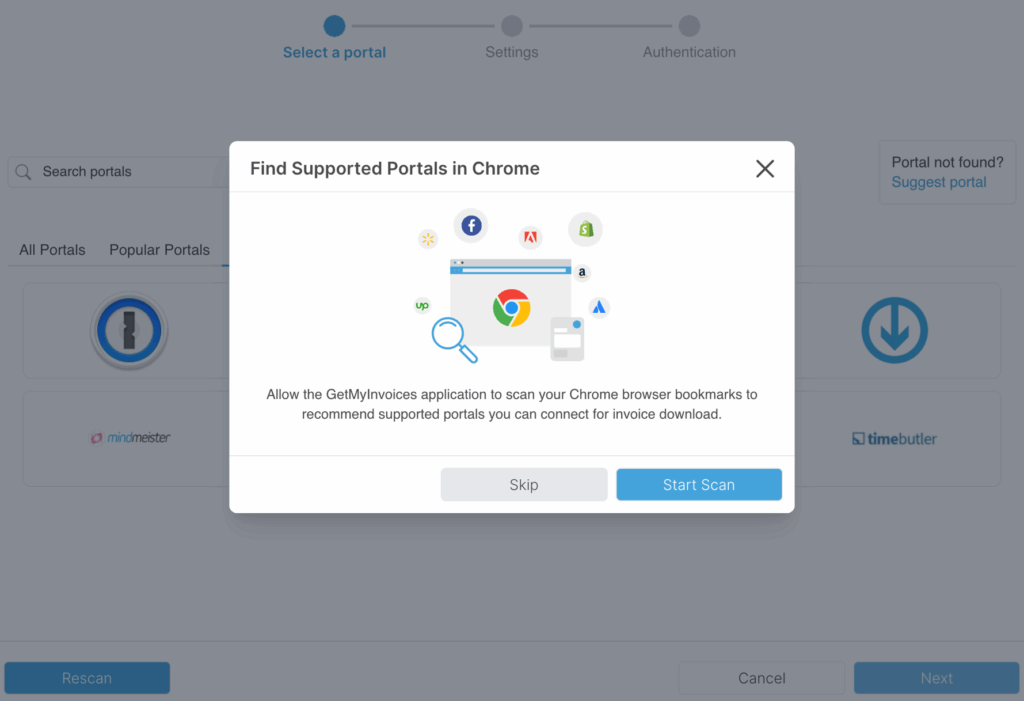
- Smart suggestions: When you first start the software, it analyzes your Chrome bookmarks and automatically recommends relevant portals.
Login options
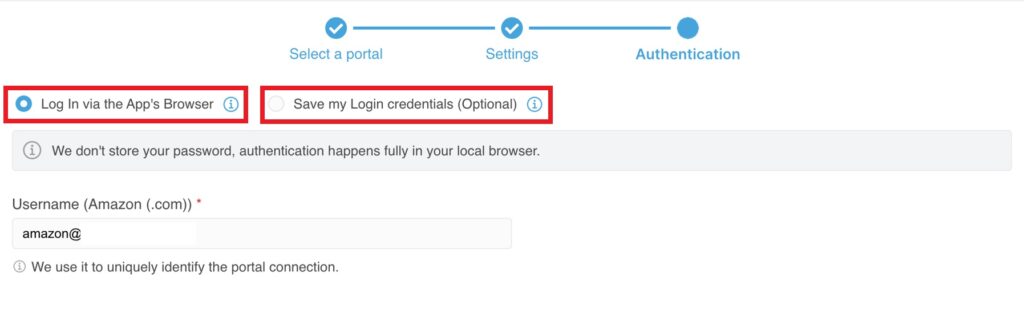
Login via browser
You can log in directly via the browser of the desktop app.
- Security: Your password is not stored - authentication takes place entirely locally in your browser.
- Note: The login remains active only as long as your browser session is valid. Once it expires, you will need to log in again. The duration of the session varies from portal to portal.
Save login details (recommended):
You can optionally save your login details securely in the desktop app so that you can log in to this portal automatically in future.
- Automatic login: Where possible, authentication will take place automatically in future to ensure a smooth process.
- Exceptions: Some portals occasionally require re-verification. In this case, you will be asked to log in again in your browser or update your saved login details.
Initial login:
When you log in for the first time, you will be asked to log in to the portal manually in your browser. Authentication will then take place automatically using the stored login details.
Invoice download on autopilot
The GetMyInvoices desktop app automates your invoice processes and takes as much work off your hands as possible. Your intervention is only required in rare cases - for example, when login details need to be updated or a 2FA code needs to be entered. We will notify you immediately as soon as your action is required.
Setup & recommendation
Automatically detect portals: Allow the app to scan your Chrome bookmarks. This allows the application to automatically suggest suitable portals that you can connect to for invoice downloads.
Portal-specific options: Set individual settings-e.g., “Purchase on account” or “Marketplace seller invoices”-and customize the retrieval to suit your needs.
Security & Data Protection
Your privacy is our top priority:
- All data is encrypted and processed securely.
- You decide whether you want to store your login details securely with us (recommended) or not.
- Invoices are securely transferred to your GetMyInvoices account so that you can conveniently manage and process them there.
Further information on data protection can be found here: https://www.getmyinvoices.com/en/security/