

 Français
 Nederlands




The status of the document indicates the process step of the corresponding document.
Step 1: Go to “Workflows” and select “Document Approvals”.
In the column “Process Status” you can see the status of the document.
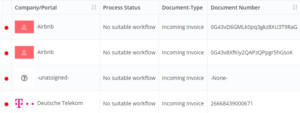
The status of the document indicates the process step of the corresponding document.
Step 1: Go to “Workflows” and select “Document Approvals”.
In the column “Process Status” you can see the status of the document.
Get in touch with our support team - usually answered within one business day.
Contact support