

 Deutsch
 Français
 Español
 Nederlands
 Italiano




If you already have an American Express Business Card linked to GetMyInvoices , you can easily take advantage of the exclusive price advantage. In just a few steps, you can switch your existing GetMyInvoices account to the new plan, while retaining all existing transactions and document links. This allows you to take full advantage of the benefits offered by the partnership between GetMyInvoices and American Express®.
Step 1
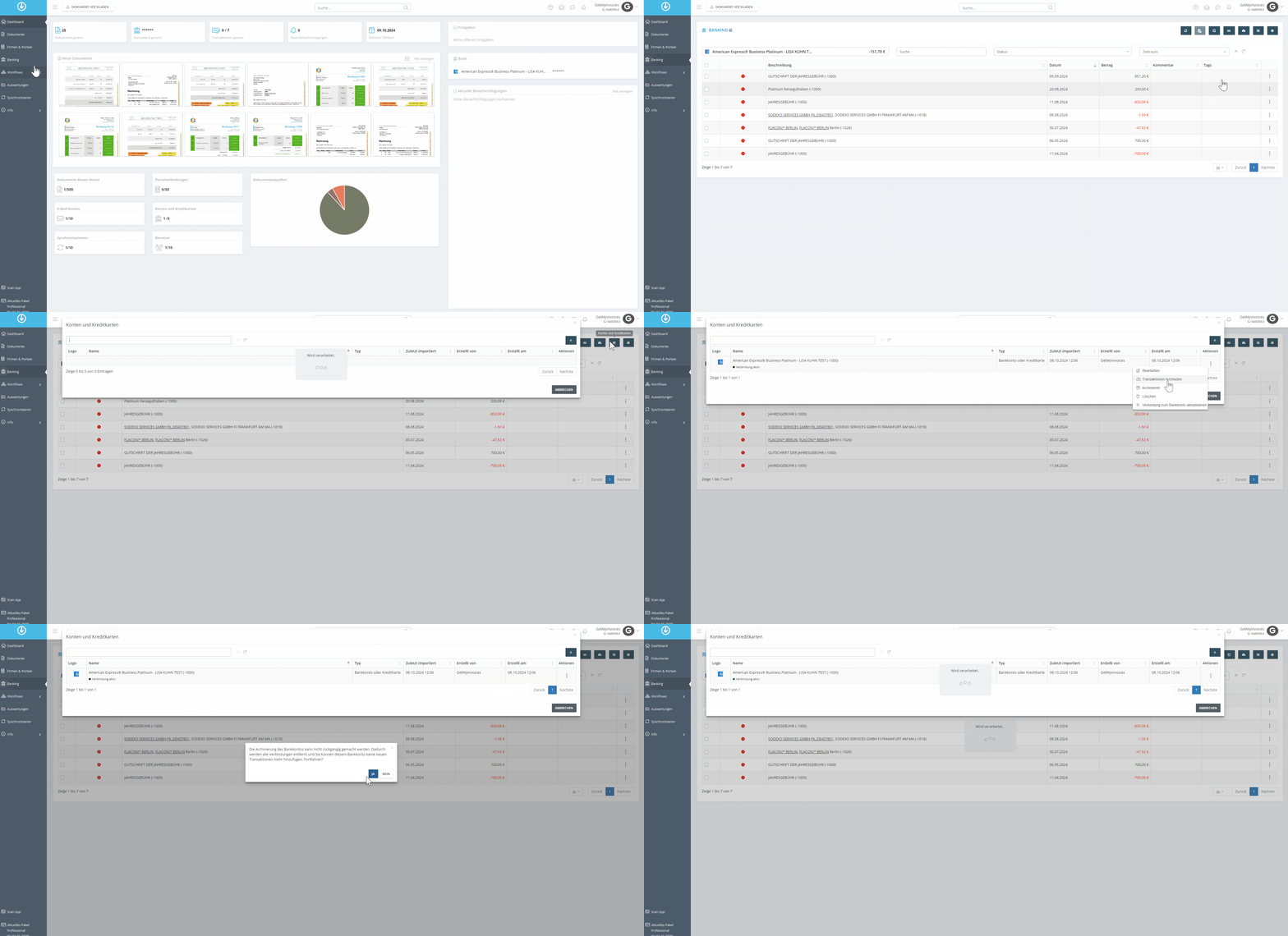
- In GetMyInvoices, navigate to the Banking section.
- Click on Accounts and Credit Cards in the menu.
- Click on “Actions” and select “Archive Current Account.” Important: This will preserve all transactions and document links.
- Then re-link the credit card to GetMyInvoices.
Important Notes:
- The GetMyInvoices Platinum package, valued at 362 euros, and the 30 percent GetMyInvoices discount are available to primary cardholders of an American Express Business Platinum Card issued in Germany.
- The GetMyInvoices 25 percent discount is available to primary cardholders of an American Express Business Gold Card issued in Germany who have agreed to the American Express Business Gold Card membership terms effective May 17, 2022 and the annual fee of €175.
- The existing GetMyInvoices package will remain unchanged until the end of its term. Upon expiration, the American Express Business Benefit will automatically apply.