

 Deutsch
 Français
 Español
 Nederlands
 Italiano




The GetMyInvoices mobile app makes it easy for you to digitize paper receipts directly and transfer them to your GetMyInvoices account. This means you always have your documents to hand without having to worry about paper filing. Whether fuel receipts, travel expense reports or other invoices: The app saves you time and significantly reduces administrative work. Thanks to intelligent OCR technology, all important information from your documents is automatically recognized and processed.
The mobile app is available free of charge in the App Store for iOS and in the Google Play Store for Android.
- Download the app to your mobile device via the respective store.
- Log in with your existing GetMyInvoices access data (e-mail and password).
- After logging in, you have direct access to your GetMyInvoices documents and can start scanning immediately.
Important features of the mobile app
→ scan & upload invoices and receipts
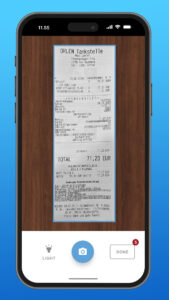
- Scan invoices and receipts directly with the app.
- Multi-page documents can be easily captured.
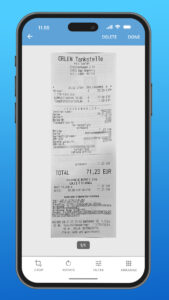
- Optimize scans with cropping and filter functions for better readability.
- Documents and preview images appear on the screen immediately after the scan. There is no need to wait for the API to respond or for the upload to be completed.
→ manage and edit documents
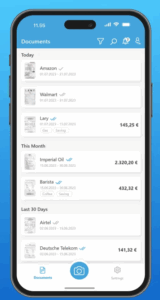
- See all the documents already saved in your GetMyInvoices account.
- Clear status indicators and revised document cards in the list view make it even easier to keep track of your documents.
- Use filter options to switch between scanned documents and all documents.
- Search documents by invoice number, order number, supplier name or notes.
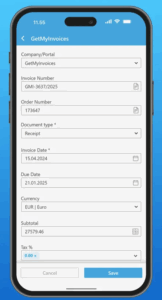
- Edit all fields of a document’s basic data, including payment method and payment status.
- In the “Edit document” view, you can add companies directly.
→ smart workflows for efficient processes
- Scan documents for linked accounts if your main account is linked to other accounts.
- Invoices can be shared via a download link: Recipients can download the invoice directly as a PDF.
- Stay informed: Notifications from your GetMyInvoices account are also displayed in the app.
- In the app, you can easily assign your receipts to the corresponding bank or credit card transactions.
→ security & user-friendliness
- Activate PIN or biometric authentication (FaceID for iOS, fingerprint for Android).
- If you have created your account with Google or LinkedIn, you can conveniently log in to the app via single sign-on (SSO).
- Choose between German and English as the app language.
- The app meets all legal requirements for document security and data protection.
→ Never-Lose-Any-Receipt: Save receipts securely, even without the Internet!
With the Never-Lose-Any-Receipt feature, your scans are initially
saved locally on the device until the upload has been successfully confirmed in
GetMyInvoices. This means that no document is lost, even with a poor connection or
temporary offline mode.
As soon as a document has been successfully uploaded, you can easily see this: two small ticks appear, similar to WhatsApp, and change color as soon as the upload is complete. This allows you to keep track of the status of your documents at all times.