

 Deutsch
 Français
 Español
 Nederlands
 Italiano




If you’re missing receipts for multiple bank transactions, request them all at once in GetMyInvoices instead of processing each transaction individually. The recipient receives an email with a link for each transaction and uploads the receipts there. GetMyInvoices then automatically assigns them.
This is ideal, for example, for freelancers who need to request receipts for multiple payments, for accounting departments with many open transactions, or for business owners who work with multiple suppliers.
Step 1
- Select Banking from the menu on the left.
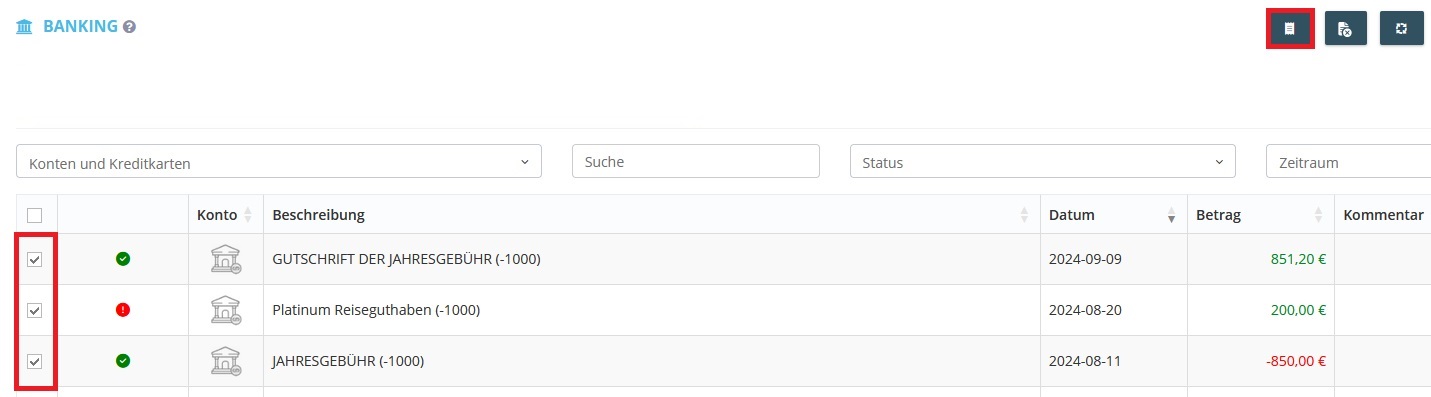
- Select the desired transactions using the checkboxes on the left side.
- After making your selection, click the “Request Receipts for Multiple Transactions” button in the upper right corner (the button is only selectable if transactions have been selected using the checkboxes).
Step 2
- A new window will open.
- Select a GetMyInvoices user (e.g., from your team). You cannot enter an external email address here! Only registered GetMyInvoices users can be selected as recipients.
- Click Send.
Note: In the message field, you can compose a custom message for the recipient or use the saved default message. The more specific your message is, the easier it will be for the recipient to find the correct document.