

 Deutsch
 Français
 Español
 Nederlands
 Italiano




Do you have a question, received an error message, or suspect a bug in GetMyInvoices? Our support team is happy to help. We typically reply within one business day.
What we can help with
- Questions about setting up and using GetMyInvoices
- Error messages, for example with portals, email import, or synchronization
- Bugs in the program, when something isn't working as it should
- Questions about packages, prices, and your contract
Good to know: Many questions are already answered in our Help Center. Use the search at the top of the page, or ask our chatbot Gimmi - you'll find it in the bottom right corner of every Help Center page. It answers your questions around the clock, so this is often the fastest way to find a solution.
How to reach us
Ticket in the dashboard (recommended for customers)
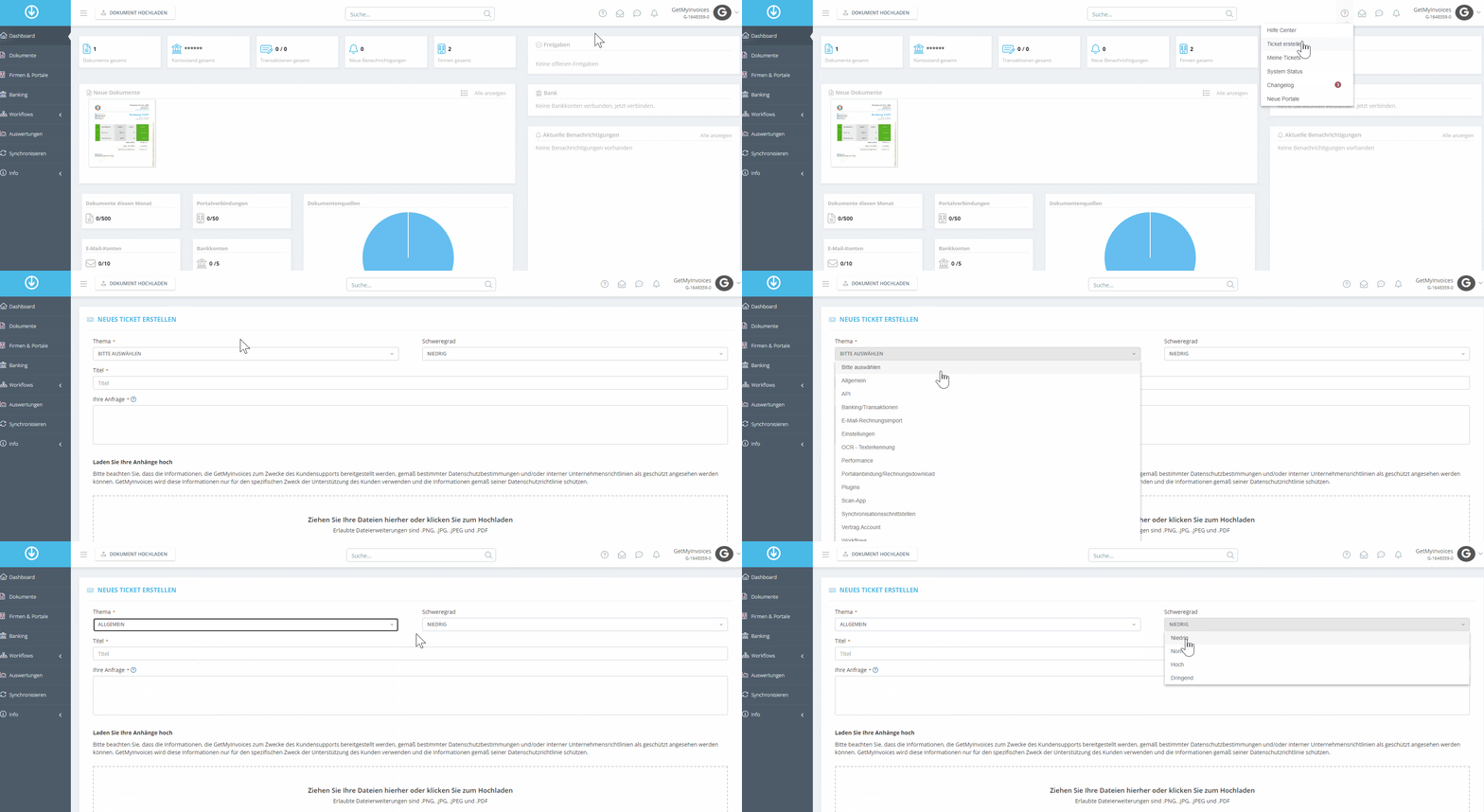
If you're already a customer, it's best to create your ticket directly in your account. That way it's automatically linked to your account and we can help you faster and more precisely.
- Log in to your dashboard .
- Click the question mark icon at the top right.
- Click Create ticket.
Contact form
Don't have an account yet, or no access to your dashboard? Create a ticket via our contact form .
You can also write to us directly at [email protected] .
Personal appointment
Would you rather talk things through? Book an appointment with our experts:
- Technical questions: book an appointment with product support
- Prices and packages: book an appointment with our sales team
Report an error message or bug
Have you spotted a bug, or does an error message leave you stuck? Please get in touch - ideally via a ticket in your dashboard. These details help us get to the bottom of the issue quickly:
- What were you doing? Briefly describe the steps before the error occurred.
- What happened? And what did you expect to happen instead?
- The exact text of the error message, if one was shown
- A screenshot of the page showing the error
- The affected portal, document, or sync account, for example the portal's name or an invoice number
- When did the error occur? Date and approximate time
- Does it happen every time, or only sometimes?
- The browser or app you're using (e.g. Chrome, desktop app, mobile app)