

 Deutsch
 Français
 Español
 Nederlands
 Italiano




With the BMD interface, you transfer your incoming invoices - automatically retrieved by GetMyInvoices - directly to your BMD software. There you continue processing them as usual in financial accounting. Manual document entry is no longer needed for this.
Setup only takes a few minutes: GetMyInvoices provides you with your personal API key. All further steps take place directly in BMD.
How the interface works
- Automatic document retrieval: GetMyInvoices automatically retrieves your incoming invoices from online portals and email inboxes.
- Direct transfer to BMD: The documents are transferred directly to BMD for posting.
- Filed in the BMD Databox: All documents land automatically in BMD's document inbox and are archived there in an audit-proof way.
- Flexible further processing: In BMD, you decide how to proceed, for example with an incoming invoice check through an approval workflow or with direct pre-entry.
- Scheduled execution: The transfer runs automatically according to a fixed schedule.
Requirements
In GetMyInvoices
- Your account has a booked full-access package. The BMD interface cannot be used yet during the trial period. You can see which package suits you on our pricing page .
In BMD
- The current BMD program version is installed.
- The BMD license “FIBU-Datenübernahme und Buchungsimportschnittstellen” is in place. You get this license from BMD - it is not part of your GetMyInvoices package.
- A one-time setup appointment with BMD has been arranged.
How to find your API key in GetMyInvoices
- Log in to your GetMyInvoices account.
- Click your user menu in the top right corner.
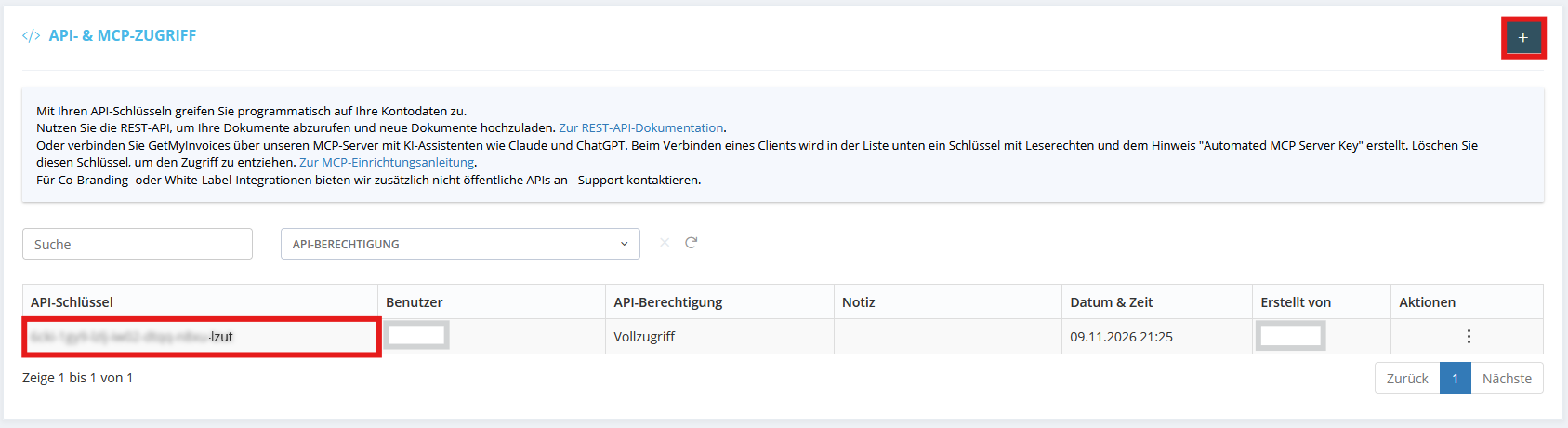
- Select API & MCP access.
- Click the plus sign in the top right corner or on “Add API key”.
- Select full access and click save.
- Copy the API key that is displayed.
BMD needs this key to establish the connection to your GetMyInvoices account.
Good to know: The API key grants access to your GetMyInvoices account. Treat it like a password and only pass it on to BMD or to the person setting up the connection in BMD.
What else is set up in BMD
The rest of the setup takes place entirely in BMD and is outside of GetMyInvoices. This includes, among other things:
- License activation
- Message types
- Databox default values
- FIBU parameters
- Collection batches
BMD carries out this part together with you during a setup appointment. BMD provides you with the complete instructions for it.